Denoise audio online: how much noise to remove
Last updated:
Clean up a recording
or drop audio or video here
MP3, WAV, M4A, FLAC, OGG, MP4, MOV, WebM · up to 60 minutes
Free 30-second preview · Free to clean up to 5 minutes, no sign-up
Upload the recording above and play the free preview. Standard has three noise reduction settings: Full removes as much as it can, Balanced lowers the background by up to 18 dB and Light by up to 12 dB. In our test, Full lowered the noise between words by 24 to 39 dB. Use Full when only the words matter, and a lower setting when the listener should still hear where you were.
Three settings, and what each one leaves behind
Once the Standard preview is ready, a Noise reduction control appears under the player. Changing it rebuilds the preview, so you can compare settings on your own file before cleaning all of it. Enhanced has no setting; it always removes as much as it can.
| Setting | Limit | Noise between words in our test | What you hear |
|---|---|---|---|
| Full | No limit | 24 to 39 dB lower | Near-silent gaps and the voice alone |
| Balanced | Up to 18 dB | 16 to 18 dB lower | A faint background behind the voice |
| Light | Up to 12 dB | 11 to 12 dB lower | The place is still audible, pushed back |
Listen: Light and Full on a roadside interview
This interview was recorded beside a road, and in the original the traffic is as loud as the speaker. The noise between words measured −13.8 dB. Light brought it down to −25.8 dB, so you still hear a street behind the voice. Full took it to −52.6 dB, and the street is gone.
Sample: a roadside interview at a half marathon, recorded next to traffic (DVIDS #604876, public domain). Standard at Light and at Full.
Listen: Balanced and Full in strong wind
Here the wind is hitting the microphone. Balanced lowered the noise between words from −16.0 dB to −33.9 dB, which leaves a soft rush of air under the voice. Full reached −53.1 dB. In a video where the viewer can see the wind blowing, a little of that sound often fits the picture better than silence.
Sample: an outdoor interview with wind hitting the mic (DVIDS #893006, public domain). Standard at Balanced and at Full.
What the settings look like
These are spectrograms of the roadside interview. Time runs left to right, pitch runs bottom to top, and brighter means louder. The bright curved stripes are the voice. In the original, the space between and above them is filled with traffic noise. Light and Balanced dim that noise evenly and leave the stripes as they were. Full turns the gaps almost black.
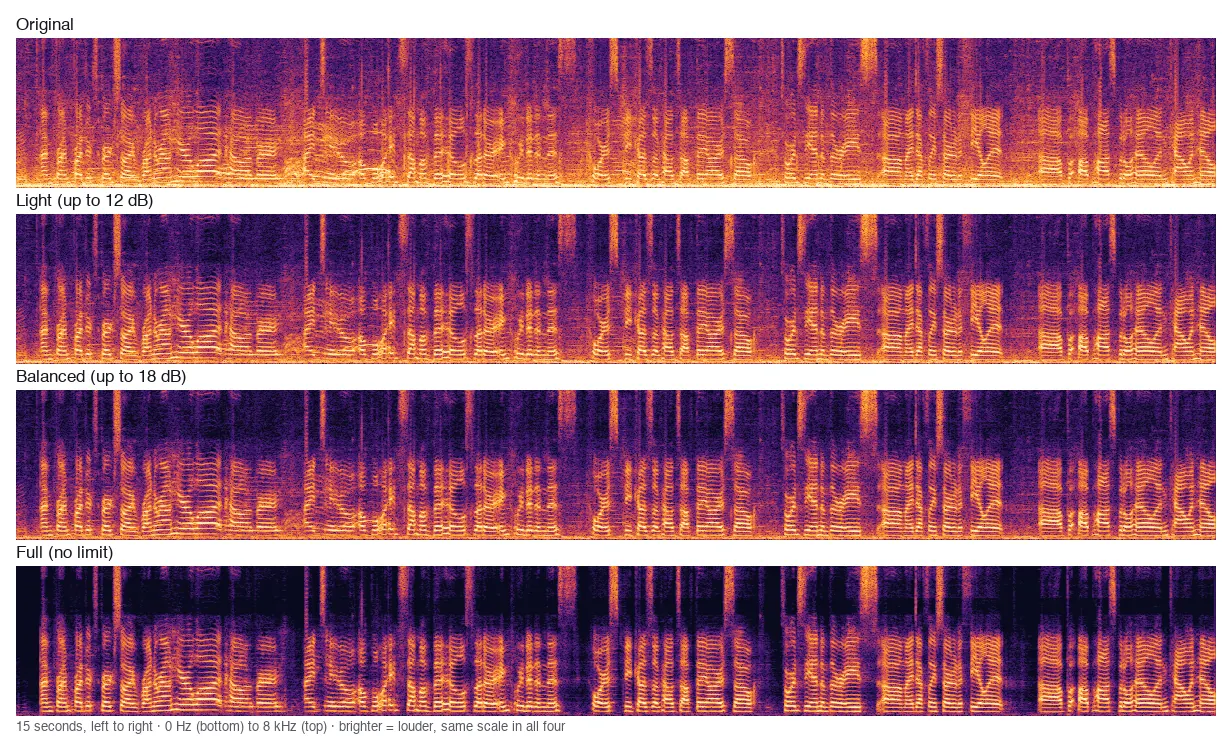
A lower setting does not treat the voice more gently
It is natural to assume that Light processes the voice less than Full. It doesn’t. The model does the same work at every setting. Light and Balanced then blend the original recording back in at a low level: roughly one part original to three parts cleaned for Light, and one to seven for Balanced. What you hear is the Full result with some of the original laid over it.
The measurements agree. In the stretches with speech, the level differed by less than 1 dB between the three settings on every recording. So if Full makes a voice sound thin, a lower setting covers that with room sound and does not undo it. When the voice itself is the problem, compare Enhanced in the preview.
Which setting for which job
Choose by what the listener needs to hear, then check with the preview.
| What the audio is for | Start with | Why |
|---|---|---|
| Transcription or captions | Full | Only the words matter |
| Podcast or voice-over | Full | Listeners on headphones hear noise in every pause |
| Audio that will sit over music | Full | The music fills the gaps, so nothing sounds empty |
| Interview on location | Balanced | Keeps a sense of place without competing with the voice |
| Vlog or outdoor video | Light or Balanced | Silence under an outdoor picture can sound dubbed |
Denoise first, then EQ, compression and loudness
If you edit after cleaning, clean first. A compressor or a loudness normaliser raises the quiet passages, and the noise in the pauses rises with them: 10 dB of make-up gain turns a −40 dB background into −30 dB.
After Full, the noise between words in our test sat between −52 and −60 dB, which leaves room for that gain. After Light or Balanced, the background you chose to keep gets louder too, so listen again once you have compressed.
Full results
We ran four recordings through Standard at each setting, using the same model file this site loads in your browser. Three are real interviews from DVIDS, recorded together with the noise: 30 seconds beside a road, 16 seconds in a busy canteen and 30 seconds in strong wind. The fourth is the 12-second air-conditioner sample from our noise test, a narrator with a real AC recording mixed in.
The real recordings have no clean voice to compare with, so we marked the pauses from the Full result: 50-millisecond slices more than 30 dB below its loudest moments count as pauses, and the rest count as speech. “Noise in pauses” is the average level of the pause slices. “Voice above noise” is how far the speech slices sit above them. See how we test for the rules we follow.
| Recording | Setting | Noise in pauses | Voice above noise |
|---|---|---|---|
| Roadside | Original | −13.8 | −1.3 |
| Roadside | Light | −25.8 | 6.2 |
| Roadside | Balanced | −31.6 | 11.6 |
| Roadside | Full | −52.6 | 32.2 |
| Canteen | Original | −36.1 | 10.3 |
| Canteen | Light | −47.3 | 20.7 |
| Canteen | Balanced | −52.0 | 25.4 |
| Canteen | Full | −59.8 | 33.0 |
| Strong wind | Original | −16.0 | 0.2 |
| Strong wind | Light | −28.0 | 6.9 |
| Strong wind | Balanced | −33.9 | 12.2 |
| Strong wind | Full | −53.1 | 31.2 |
| AC hum | Original | −21.4 | 4.6 |
| AC hum | Light | −33.2 | 14.0 |
| AC hum | Balanced | −38.9 | 19.5 |
| AC hum | Full | −54.1 | 34.4 |
What this test doesn’t show
Four recordings is a small sample, and one of them is a mix, not a real recording. We measured levels, not how natural the result sounds, so the table can’t tell you which setting you will prefer. The preview can. Because the pauses were marked from the Full result, any quiet speech that Full removed would be counted as a pause. We did not test Enhanced here, since it has no setting; our noise test compares the two modes.
Common questions
Is denoising the same as noise reduction?
Yes. Denoise, noise reduction and noise removal all mean lowering the sounds around a voice. Different editors use different names for the same job.
Can I change the setting after I hear the preview?
Yes. Pick another setting under the player and the Standard preview is rebuilt on your device. Nothing is uploaded, and you can switch as often as you like before cleaning the full file.
Does a lower setting use fewer credits?
No. Standard costs the same at every setting: free for files up to 5 minutes, then 1 credit per minute.
Does Enhanced have a strength setting?
No. Enhanced always removes as much noise as it can. To keep some background, use Standard at Light or Balanced.
Hear the difference in 30 seconds
Choose a file